
AICKO PDF is a free PDF editor for Windows 10 and 11. It reads, edits, converts, compresses, signs and protects PDF files without a subscription, an account or an Internet connection, and it is easy to learn.
French learners handle PDF files all the time: worksheets, scanned textbook pages, forms. AICKO PDF keeps those documents on your computer and lets you work on them directly.
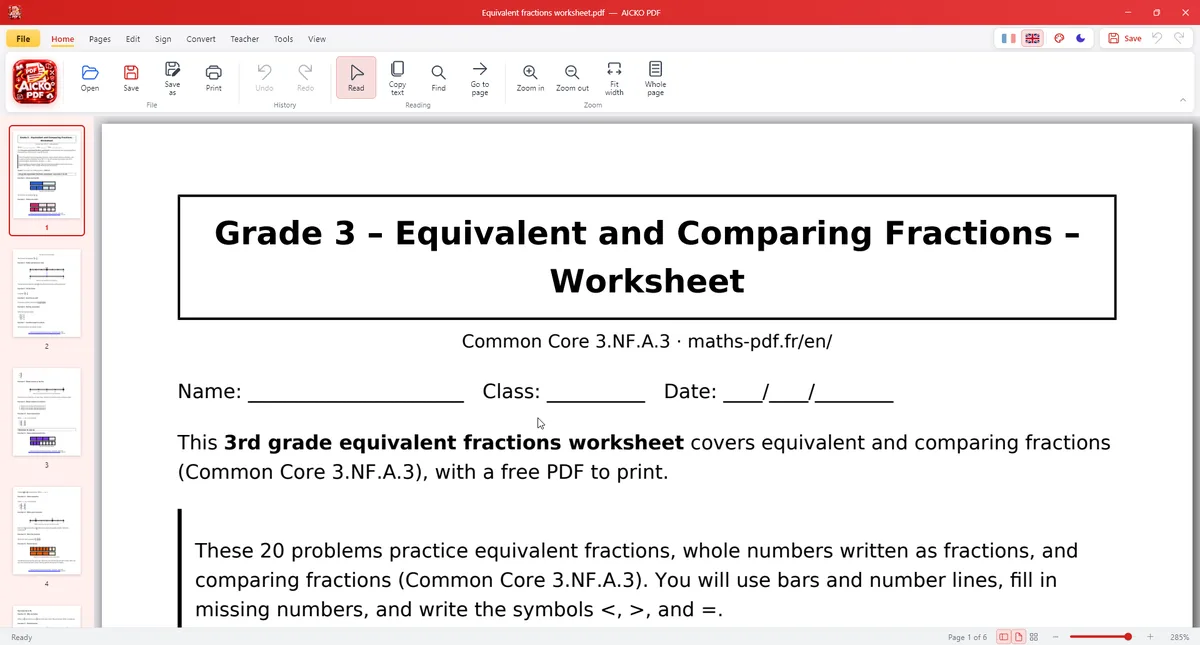
At a glance
- Platform: Windows 10 and 11
- Source: Microsoft Store
- Price: free
- Main tools: edit, merge, convert, sign, OCR
- Works offline: yes
- Account required: no
A typical day with PDF files
You download a French worksheet, open it in AICKO PDF and fill in the blanks. A scanned textbook page is also in your folder, so you run text recognition on it. The text becomes searchable, and you can copy a paragraph into your notes.
Before the lesson, you merge three worksheets into a single file, remove a page you do not need and compress the result so that it goes through email.
What this free PDF editor does
The main tools are:
- editing text: double-click a line to correct it, with the original font, size and colour kept;
- organising pages: drag thumbnails, delete, rotate, duplicate, extract, insert, merge and split;
- converting PDF to Word (.docx), PDF to PNG or JPG, and images or photos to PDF;
- compressing, signing, stamping, adding a watermark and page numbers;
- protecting with an AES-256 password and removing sensitive information for good;
- text recognition (OCR) for scanned files, form filling and reading a document aloud;
- tools for teachers: fill-in-the-blank sheet, answer separation, A5 booklet, 2 or 4 pages per sheet and a dyslexia-friendly version.
Getting started with a worksheet
- Install AICKO PDF from the Microsoft Store.
- Open a worksheet by dragging it into the window.
- Click on the text to type your answers, or use the pen.
- Save a copy under a new name.
- Print it, or export the pages as images to share.
Why French learners use it
Our site offers printable material for every level. Start from the A1 worksheets or the B1 section, complete them on screen and keep the corrected copies together.
If you teach French, the fill-in-the-blank and booklet tools turn a lesson into a handout in a few minutes. Students of the AP French course can annotate sample texts without printing them.
Tips for handling worksheets with a free PDF editor
Name your files by date and topic, for instance with the level and the week. When you merge worksheets, keep the original files in a separate folder, so that you can restart from a clean copy.
The fill-in-the-blank tool is also useful for self-testing. Turn a text you have read into a gap-fill sheet, wait a day, then try to complete it from memory. It is a quick way to check which words you really know.
Compatibility and installation
AICKO PDF works on Windows 10 and 11, through the Microsoft Store. It runs offline and your files stay on your computer. There is no subscription, no account and no advertising.
The program is free, available in French and English, with a dark mode and seven colours. A version for Android phones also exists.
Frequently asked questions
Is AICKO PDF free?
Yes. AICKO PDF is free software for Windows. It requires no subscription and no account, and it works without an Internet connection, so your PDF files remain on your computer.
Can AICKO PDF convert a PDF to Word?
Yes. It converts PDF to Word (.docx) and to PNG or JPG images, and it turns images and photos into PDF files.
Can I read a scanned PDF and search it?
Yes. The text recognition (OCR) makes a scanned PDF searchable and copyable. It relies on the recognition tool included in Windows.
Does AICKO PDF have tools for teachers?
Yes. It can create fill-in-the-blank sheets, separate questions from answers, build A5 booklets, print two or four pages per sheet and prepare a version for dyslexic pupils.
